Does iPhone screen recording record sound? Yes — but not the half you expect
Ask whether iPhone screen recording captures sound and the honest answer is half yes. The sound an app makes is recorded by default. Your voice is not, and nothing tells you so until you play the recording back. They are two different systems and they are worth separating properly.
The direct answer
iOS screen recording captures internal audio — the sound the app itself plays — automatically. A game's effects, a video's soundtrack, a notification chime: all of it is in the recording without you doing anything.
It does not capture your voice unless the microphone is switched on first, and the microphone is off by default. That asymmetry is the source of almost every complaint about screen recording sound, because the recording is not silent — it is half there, which looks much more like a bug than like a setting.
Internal audio and your voice arrive by different routes
This is the distinction worth holding on to, because everything else follows from it.
Internal audio is handed to the recorder by the system. The app plays sound, iOS routes a copy to whatever is capturing the screen, and no permission is involved because nothing private is being opened.
Your voice comes from the microphone, which has to be switched on — with Reel, the Microphone button in the sheet iOS shows when you tap record; with the built-in recorder, a long press on its Control Centre button — and then set to an audible level. Two things that can each be wrong independently, against internal audio's zero.
So when sound is missing, the first useful question is never "why is there no sound" — it is which of the two is missing. One points at the phone's state; the other points at the microphone switch and the levels.
Internal audio with the built-in recorder
Control Centre's recorder captures app audio with no setup at all. There is exactly one thing that stops it, and it is not a recording setting.
A phone in silent mode — the ring/silent switch, or the Action button from iPhone 15 Pro onwards — makes many apps play nothing. The recorder then faithfully captures nothing, because there was nothing to capture. Play the app out loud and confirm you can hear it before you record; if you cannot hear it live, no recorder will find it.
Adding your voice
In the built-in recorder the microphone is behind a long press rather than a tap. Press and hold the record button in Control Centre instead of tapping it, and a sheet appears with a Microphone toggle. Turn it on before recording — a finished take cannot have narration added to it.
That toggle is remembered, which cuts both ways: once on it stays on, including for the recording you did not want your room noise in.
Two levels instead of one toggle
A toggle gives you on or off. What a recording usually needs is a balance, and that is where a dedicated recorder differs.
In Reel, Settings → Audio carries a level for the microphone and a level for the app, independently, and both can be changed before or during a recording. A demo with app sound and no voice, a voiceover with the app muted so the music does not fight you, or both together at a chosen ratio — each is a setting rather than a compromise.
They are also remembered, which is worth knowing before you blame the app: a voiceover session from last week that muted the app leaves the app muted this week. Look at both before a recording that matters.
One track or two
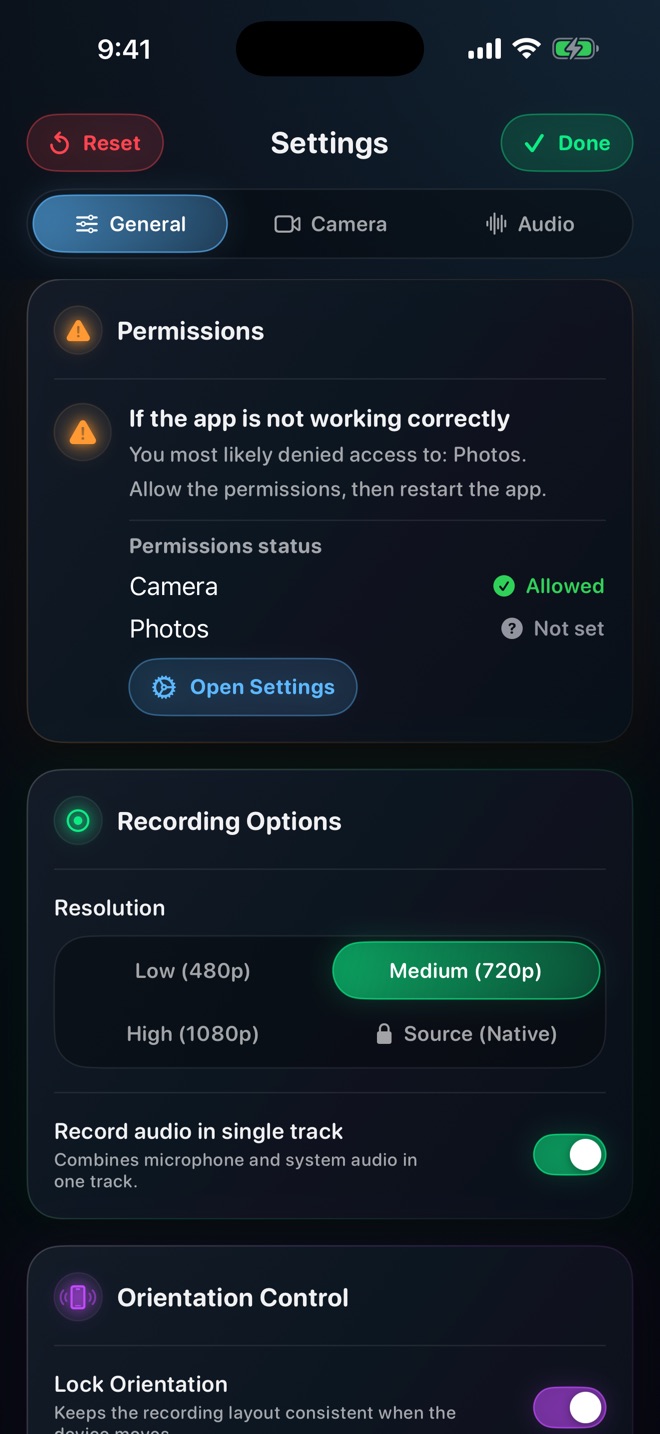
Record audio in single track, in Settings → General, is on by default and mixes microphone and app into one stereo track. That is what you want for anything going straight to a message, a story or a bug report: one track plays everywhere and there is nothing to mix.
Turn it off and the MP4 carries two separate audio tracks. In an editor that is a real gain — duck the app under your voice, cut a cough without touching the music, or replace the voiceover entirely in a quiet room later.
The cost is portability. Some players, messaging apps and upload paths read only the first audio track and ignore the second, so a two-track recording can sound complete on your phone and arrive missing half its sound somewhere else. Keep it on unless the recording is going into an editor.
What iOS will never give any recorder
Two things, and both are worth knowing before you go looking for an app that promises otherwise.
- Protected audio. Some streaming video and music apps mark their sound as protected and iOS withholds it from every screen recorder on the system. The picture records; the sound does not. It is enforced below the level any app can reach, so an App Store description claiming to capture it is describing something it cannot do.
- Call audio. Neither phone calls nor FaceTime are exposed to screen recorders, for privacy reasons. Reel does not record calls and no recorder on the store does.
iPad is the same, with one difference
Everything above applies to iPad unchanged — same internal audio, same Microphone button in the record sheet, same two levels. The difference is physical rather than technical: an iPad has no silent switch, so the most common cause of a silent recording on iPhone does not exist there, and the microphone is further from your mouth than a phone's, which makes an external one more worth considering.
Before you press record
Thirty seconds that prevent the whole problem:
- Play the app's sound out loud. If you cannot hear it, the phone is in silent mode or the audio is protected.
- Confirm the microphone is on — long press in Control Centre, or the levels in Settings → Audio.
- Record five seconds and say one sentence.
- Play it back with the volume up and listen for both halves.
Does iPhone screen recording record sound?
It records internal audio — what the app plays — automatically. It does not record your voice unless you turn the microphone on first, and the microphone is off by default.
How do I record internal sound on an iPhone?
You already are: app audio is captured by default. If it is missing, the phone was in silent mode so the app played nothing, or the app uses a protected audio path that iOS withholds from every recorder.
How do I screen record with my voice and the app sound together?
Turn the microphone on — a long press on the Control Centre record button, or the mic level in Reel's Settings → Audio, where the app sound has its own level so you can set the balance rather than just on or off.
Can I record a phone call or FaceTime audio?
No. iOS does not expose call audio to screen recorders, for privacy reasons.
Why is there no sound from Netflix or Spotify in my recording?
Their audio is marked protected and iOS withholds it from every screen recorder. No app can capture it, and none should claim to.
Can I add music afterwards?
Yes, in any editor. Record with the microphone on and the app audio off if you plan to.
It has sound on my phone but not after I share it.
Record audio in single track was off, so the file has two audio tracks and whatever you sent it through played only the first. Turn it back on in Settings → General.
Does this work the same on iPad?
Yes. The one difference is that an iPad has no silent switch, so the most common cause of a silent iPhone recording cannot happen.