Screen recording has no sound? Find the cause in under a minute
A silent screen recording is almost never a broken recorder. It is one of seven ordinary things, and which one it is depends on a question you can answer in ten seconds: is all the sound missing, or only half of it? Start there and you will not check the other six.
Start here: which half is missing?
A screen recording carries two different kinds of sound, and they arrive by completely different routes. What the app plays — a game, a video, a notification chime — is handed to the recorder by the system. What you say arrives through the microphone. They fail separately, for unrelated reasons, and almost every wasted hour on this problem comes from checking the wrong half.
So play back the failed recording and listen for which one is gone. That single observation removes two thirds of this page.
- Nothing at all, complete silence — go to the silent switch first, then protected audio.
- The app is there, your voice is not — the microphone switch or permission, then the mic level.
- Your voice is there, the app is not — the app level, then protected audio.
- It sounded fine on the phone but arrived silent somewhere else — the two-track case, near the end.
1. The silent switch, and what it really does
On an iPhone the ring/silent switch — or, from iPhone 15 Pro onwards, the Action button set to silent mode — does not mute the recording. It mutes the app. Many apps check whether the device is in silent mode and simply play nothing, and a recorder cannot capture sound that was never produced. The result looks identical to a broken recorder, which is why this is the most common cause and the least suspected.
The test takes five seconds: before you record, play the thing you are about to record and confirm you can hear it out of the speaker. If you cannot hear it live, no recorder on the App Store will capture it.
This is also the one cause that does not exist on a Mac, which has no silent switch. If you are on a Mac, skip to the Mac section.
2. The microphone was off, or never allowed
On iPhone and iPad, Reel records your voice only if the microphone is on in the sheet iOS shows when you tap record: the Microphone button there has to read Microphone On before you start. Nothing warns you afterwards. The recording runs normally, the file saves normally, and your voice is simply not in it — so look at that button every time.
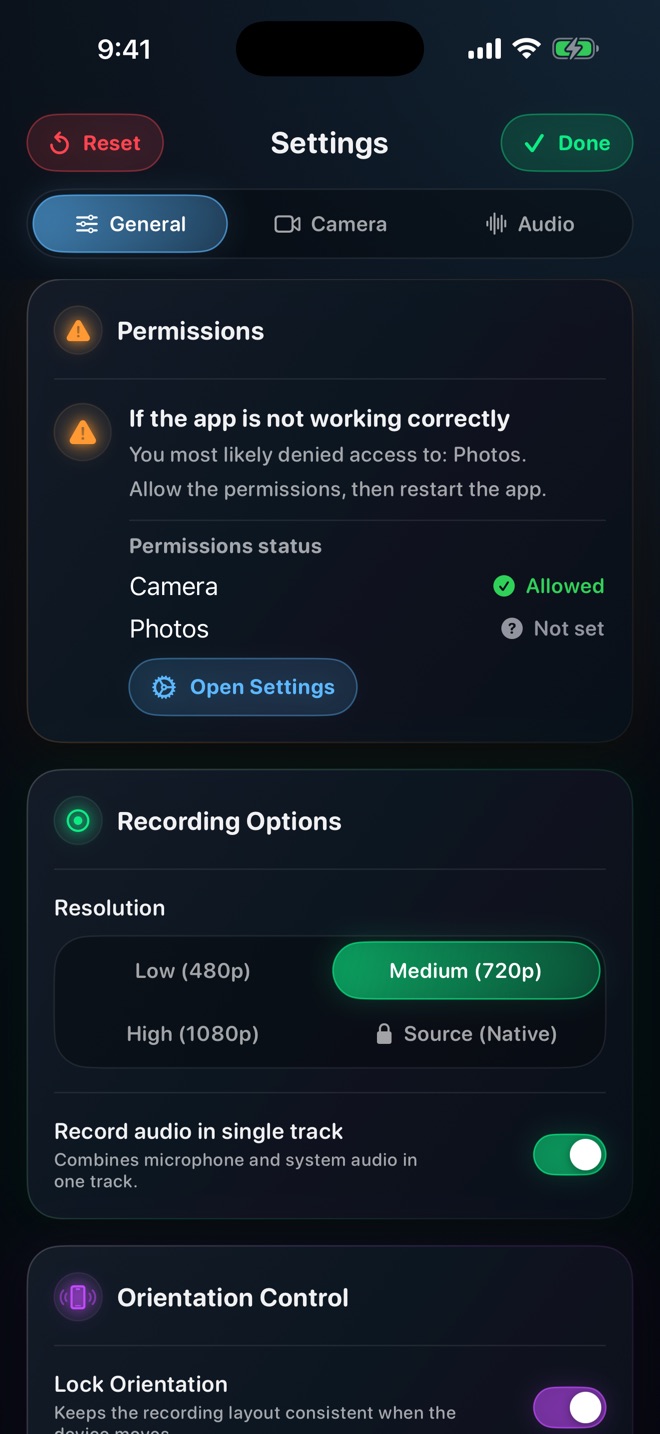
On a Mac, macOS asks for the microphone the first time Reel records and remembers the answer. If you declined it, turn it on in System Settings → Privacy & Security → Microphone; Reel's Settings → General shows a card for any permission that is missing, the microphone included.
Worth knowing the difference from the next cause: a microphone that was off or not allowed was never opened, and records nothing. A level at zero means it was opened and recorded nothing audible. Both sound like silence; only the first is fixed before you press record.
3. A level left at zero from last time
Reel keeps two independent levels — one for the microphone, one for the app's audio — in Settings → Audio, and it remembers where you left them. That is deliberate and usually helpful: the voiceover setup you built last week is still there this week. It is also the reason a recording made three days after you muted something comes back half silent.
If you once recorded a demo with your voice off, the mic is still off. If you once recorded a voiceover with the app muted so the music would not fight you, the app is still muted. Neither announces itself when you press record.
Open Settings → Audio before a recording that matters and look at both. They can also be changed while recording, which is the fastest way to confirm a level is the problem: start a throwaway recording, move one, play it back.
4. Protected audio, which no recorder can capture
Some streaming video and music apps mark their audio as protected, and iOS withholds it from every screen recorder on the system. The picture records; the sound does not. This is enforced below the level any app can reach — it is not a limitation of one recorder, and an app promising otherwise in its App Store description is describing something it cannot do.
You can recognise it quickly: the recording is perfectly normal except that one app is silent, and your own voice, if the microphone was on, is there at full volume. Recording the same screen from a different app produces sound as usual.
There is nothing to fix. If you need that audio in a video, the answer is a licence from whoever owns it, not a different recorder.
5. A faint, distant or hollow voice: Bluetooth routing
This one does not produce silence, it produces something worse — a recording you do not notice is bad until you are editing it. With AirPods, a headset or a car connected, the system may choose that device's microphone rather than the phone's, and a microphone sitting in your ear at arm's length from your mouth records a thin, distant voice with the room in it.
Car systems are the sharpest version: the input can route to the car's cabin microphone in the roof lining, several feet away.
Disconnect the accessory before recording, or keep it and speak much closer. If you want a deliberately better microphone rather than an accidental one, that is a separate decision.
6. The sound was fine, the file is not: two audio tracks
This is the cause almost nobody finds on their own, because the recording is not actually broken.
Reel's Record audio in single track, in Settings → General, is on by default and mixes your microphone and the app's audio into one track. Turn it off and the MP4 gets two separate audio tracks instead — which is exactly what you want if the recording is going into an editor, because you can then lower the app under your voice, or cut a cough without touching the music.
The catch arrives later. Some players, messaging apps and upload paths read only the first audio track of a file and ignore the rest. The recording plays perfectly in one place and comes back missing half its sound in another, and because the first place worked, the recorder looks innocent.
If a recording sounds complete on your phone and wrong after you send it, this is the first thing to check. Turn Record audio in single track back on for anything going straight to a message, a story or a bug report, and leave it off only for recordings you are going to edit.
7. On a Mac the list is shorter
There is no silent switch, so cause one disappears. Microphone permission still applies and lives in System Settings → Privacy & Security → Microphone. The two levels behave the same way and are remembered the same way. Protected audio is enforced the same way.
What is different is that a Mac usually has more than one microphone available — the built-in one, a webcam's, a headset, an audio interface — and the system may not be using the one you assume. If the voice is present but wrong, the input device is the place to look.
The ten-second check that prevents all of this
Before any recording you would be annoyed to lose, spend ten seconds:
- Play the app's sound out loud and confirm you can hear it. That clears the silent switch and protected audio at once.
- Open Settings → Audio and look at both levels rather than assuming them.
- Record five seconds, say one sentence, stop.
- Play it back with the phone's volume up. If both halves are there, the long recording will be fine.
What to do when none of it applies
If all seven check out and a recording is still silent, the useful thing to report is not "no sound" but which half is missing, on which device, in which app, and whether a five-second test recording of the home screen with your voice has the same problem. That last test separates a recorder problem from an app-specific one in one step, and it is the first thing anyone who can help will ask for.
Why does my screen recording have no sound at all?
On an iPhone or iPad, the silent switch first — many apps play nothing in silent mode and a recorder cannot capture what was never played. If your voice is also missing, check that the microphone was on: in Reel on iPhone and iPad that is the Microphone button in the sheet iOS shows when you tap record, and on a Mac the microphone permission in System Settings → Privacy & Security. If the app is a streaming one, its audio may be protected and withheld from every recorder.
The video has sound but my voice is missing.
The microphone was off when the recording started, or its level is at zero from an earlier session. On iPhone and iPad, turn on the Microphone button in the sheet iOS shows when you tap record; on a Mac, check System Settings → Privacy & Security → Microphone. Then look at Reel's Settings → Audio, which remembers the levels you last used.
My voice is there but the app is silent.
Either the app level is at zero in Settings → Audio, the device was in silent mode so the app played nothing, or the app uses a protected audio path that iOS withholds from every screen recorder.
It had sound on my phone but not after I sent it.
Record audio in single track was off, so the file has two separate audio tracks and whatever you sent it through played only the first. Turn it back on in Settings → General for recordings that are not going into an editor.
Why does screen recording not capture audio from Netflix, Spotify or similar apps?
Their audio is marked protected and iOS withholds it from every screen recorder on the system. It is enforced below the level any app can reach, so no recorder can capture it and none should claim to.
Does iPhone screen recording record sound by default?
The system recorder captures what apps play. Your voice needs the microphone, which is switched on separately — a long press on the Control Centre record button for the built-in recorder, the Microphone button in the record sheet for Reel — which is why so many recordings come back with the app audio present and the narration missing.
Can I record a phone call or FaceTime audio?
No. iOS does not expose call audio to screen recorders, for privacy reasons, and Reel does not record calls.
My voice sounds faint and far away.
The system is probably using a Bluetooth microphone — AirPods, a headset, or a car. Disconnect it before recording, or speak much closer to whichever microphone is actually in use.