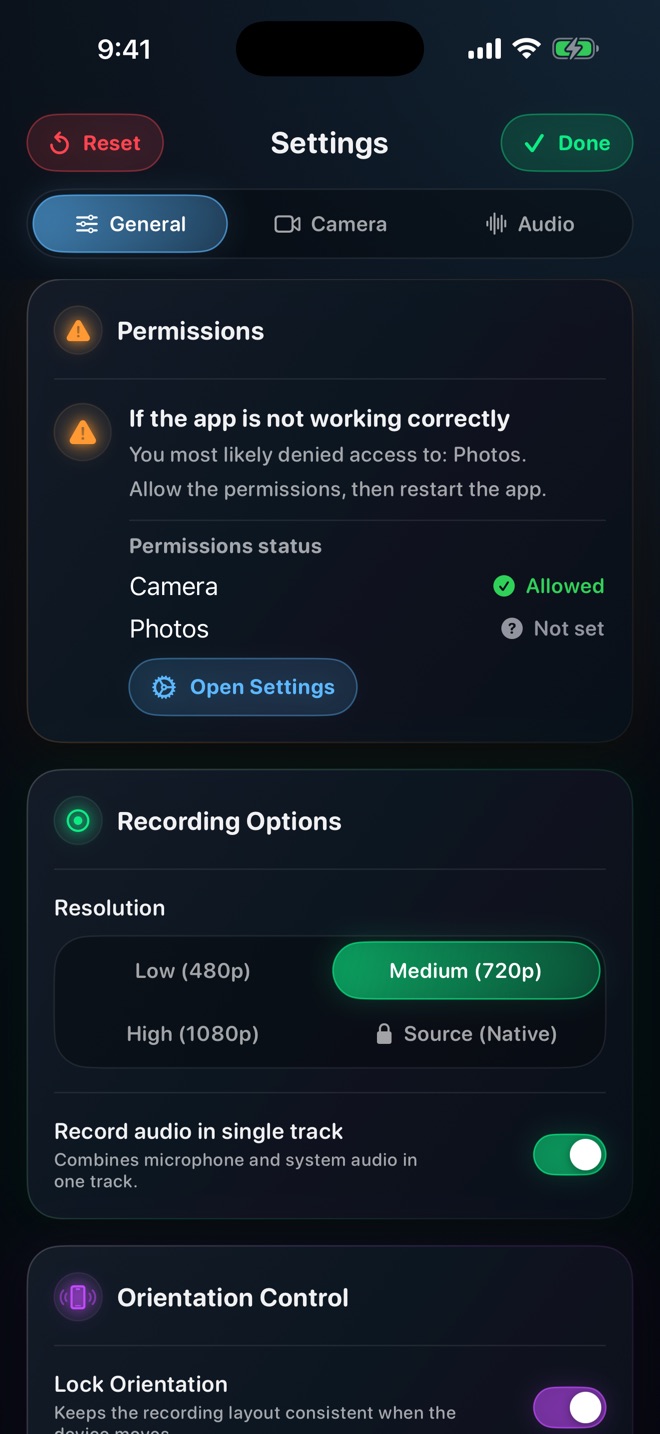
Choose recording resolution by testing the smallest important text
The best resolution is the one that preserves the information your viewer needs without creating an unnecessary delivery problem. Test the smallest important text, not a colourful home screen. A higher pixel count cannot repair a badly framed interface or a blurry original image.
Define what must remain legible
List three details the viewer has to read: perhaps a menu label, a code line and a numeric result. Use a safe duplicate document containing those elements. Include the longest label, a selected state and an error message rather than testing only a large heading.
Decide where the viewer will watch: a phone held normally, a desktop player or a training portal. Judge at that display size. A clip that looks sharp when paused full-screen on your recording device may be hard to follow in an embedded player.
Change one recording variable at a time
In Reel, the reviewed quality controls distinguish lower recording tiers from Source (Native). The implementation caps the shorter side while retaining the source aspect ratio and does not enlarge a smaller input. Native means source pixel sizing, not lossless encoding.
Make two recordings of the same sequence using supported quality choices. Keep orientation, interface zoom, camera placement and the action unchanged. Name the files by the setting used, then compare the saved versions. Do not compare different content and attribute every difference to resolution.
Use a concrete acceptance test
For an illustrative spreadsheet lesson, ask whether the viewer can distinguish 8 from 3 in a total, read the active cell reference and follow the selected row. If one part fails, enlarge that interface region and record again before increasing the entire video size.
Inspect both a paused frame and normal-speed playback. Scrolling text can be harder to read even when a still frame is sharp. Pause on the important result; do not make the audience extract a number from a fast pan.
Compare the files you will actually send
Record the duration and size of each candidate. Then send or upload the chosen copy through the intended channel. Some delivery paths process video, so the received rendition may differ from the original. Compare that received rendition using the same reading test.
If a portal limits size or resolution, obtain its current requirements rather than guessing. Increasing the capture resolution and shrinking the video later can still be useful, but it is another export stage that must be checked. Keep the original until the final copy passes.
Choose the smallest acceptable result
If both versions pass the same reading test, use the one that fits the delivery workflow more comfortably. If neither passes, change the presentation: simplify the screen, enlarge text, divide the lesson or show the important panel separately.
Save the selected setting alongside the lesson’s audience and framing notes. It is a tested choice for that workflow, not a universal preset for every device, app or game. Recheck when the interface, destination player or recording device changes.
Is Source Native always the clearest choice?
It preserves source sizing in the inspected implementation, but framing, compression, source quality and playback scale still affect readability.
Will a 1080p setting always produce a 1920 × 1080 movie?
No. The source aspect ratio matters. Inspect the actual dimensions instead of assuming a landscape canvas from a quality label.